Native vector transfer to Figma via keyboard shortcuts without requiring plugins
A closer look at the top alternatives
1
Consistent Character AI instead of Figr
AI image toolsAI design and graphics tools
Good specialized serviceTrial
Consistent Character AI saves authors, comic artists, and indie game developers from endless prompt roulette and manual Photoshop fixing. It offers an accessible way to produce consistent character sheets, book spreads, and webtoon panels from a single reference image without messing with local installations or LoRA training.
Pros
Reliable character identity preservation from a single photo reference without complex setup.
Dedicated workflows for illustrated storybooks, pose sheets, and character turnarounds.
Cons
Dramatic camera angle shifts, like extreme profile views, can still trigger subtle identity drift.
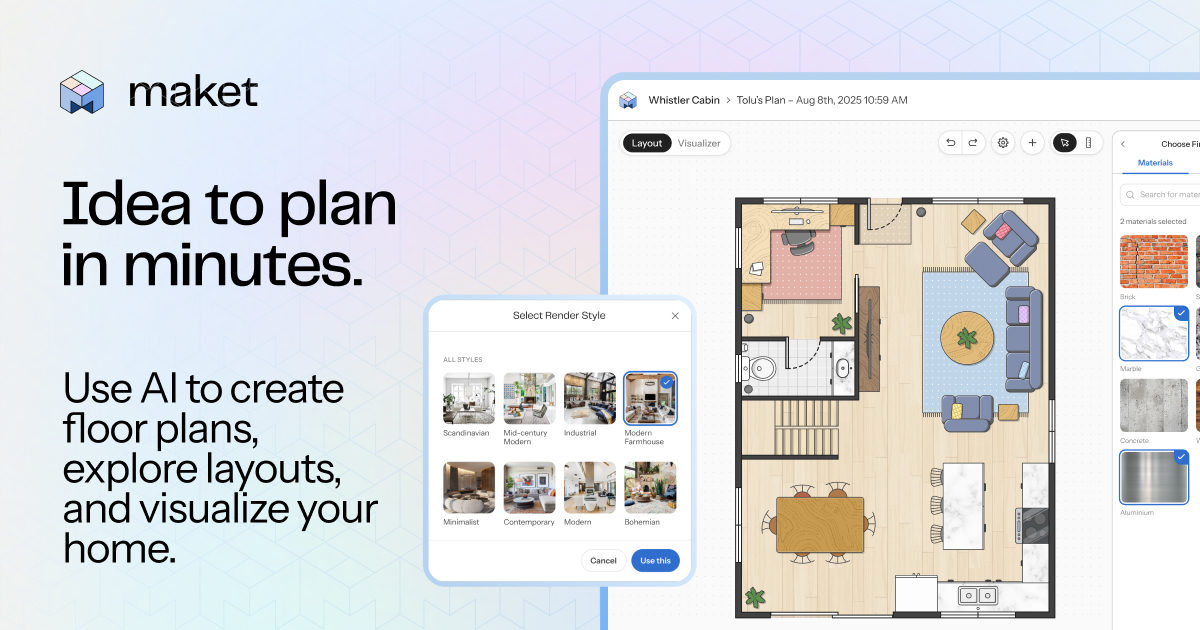
Maket accelerates schematic design and early layout exploration. It helps homeowners and renovators test spatial configurations before hiring builders, allows architects to bring multiple validated concepts to a first client meeting, and gives real estate pros an easy way to transform flat listing plans into interactive 3D models.
Pros
Generates editable multi-story vector layouts with realistic dimensions rather than abstract pictorial mockups
Seamless real-time transition between a 2D dimensional canvas and an interactive 3D walkthrough
Cons
Outputs schematic drafts only: no load calculations, MEP engineering, or guaranteed building code compliance
Flowstep: Your AI Design Assistant instead of Figr
AI coding toolsAI design and graphics tools
Good specialized serviceTrial
Flowstep eliminates blank-canvas paralysis for product designers, engineers, and product managers. It lets teams turn PRDs and prompts into interactive prototypes, clean Figma vectors, and deployable Tailwind and React UI without messy back-and-forth handoffs.
Pros
Native vector transfer to Figma via keyboard shortcuts without requiring plugins
Official MCP server support for generating and editing screens straight from AI coding IDEs
Cons
Copying to Figma relies on browser clipboard access and fails if you switch tabs while the asset is preparing