
 Trial
Trial
Figr
Quick facts
- Pricing model
- Trial
- Minimum price
- Free
- Free access
- Yes
- Regional payment options
- Pay directly on the website
- Service status
- Online, checked
- User rating
Developer and reliability
Information about the developer and the service's terms. This is a factual reference, not a quality assessment or a guarantee of safety.
- Developer
- Figrfast systems Private Limited
- Legal entity
- Figrfast Systems Private Limited
- Legal entity's country
- India
- Registration details
- CIN U62091DL2023PTC417747
- Domain registered
- March 16, 2023
- The domain registration date is not the service's launch date.
Compare with alternatives
Choose a pair to compare features, pricing and assessments.
Editorial assessment
Good specialized serviceWhen you try typical interface generators, the illusion shatters fast: the AI hands you a gorgeous screen, but the moment you try to implement it, you discover there is no input validation, no consideration for user roles, and no plan for slow connections. Figr stands out because it deliberately breaks the habit of rushing to draw a pretty picture.
The platform steps into the role of a meticulous lead designer. Before drafting UI, it demands your context, peppers you with questions about business rules, makes you plan out failure states, and only then compiles an interactive flow. The ecosystem integrations do real heavy lifting here: capturing live screens with the browser extension and syncing directly with Figma saves substantial time.
Why is it a dependable specialized service rather than an unconditional breakthrough? It all comes down to context: Figr is exceptional when you plug it into an established product backed by design tokens and clear specs. If you feed it a raw napkin sketch for an unbuilt startup, the magic fades quickly, and the credit burn rate reminds you to keep a close eye on your plan tier.
- Functionality Good
- Price and value Average
- Ease of use Good
- Reliability and support Good
- Innovation Good
About the tool
Most AI interface generators run on a single trick: take a short prompt, whip up a slick dashboard, and call it a day. The trouble begins the minute you hand that mock-up to an engineer and realize nobody accounted for validation errors, empty states, or role-based permission locks. Figr approaches interface design from the opposite direction: it acts like an exacting product lead who refuses to draw a single frame until the business logic actually holds up.
Instead of starting from a blank slate, Figr ingests the real-world context of your product. You feed it existing screens through a browser extension, connect your Figma libraries, attach PRDs, or link your component code. From there, the platform's reasoning engine breaks down the workflow:
- Asks probing questions about user drop-off points, missing permissions, and edge cases before generating screens.
- Converts written PRDs and feature requirements into step-by-step UX flows and structured state boards.
- Automatically surfaces tricky states teams routinely skip, such as network timeouts, quota limits, empty screens, and validation traps.
- Generates interactive, high-fidelity prototypes on React or Angular components with background syntax linting.
- Syncs cleanly back to Figma as editable vector frames with auto-layouts, tokens, and native component structures.
How it helps you
Helps Product Managers and UI/UX designers building complex SaaS products turn messy feature requirements into vetted UX flows and Figma-ready prototypes without losing weeks to back-and-forth alignment.
Pros and cons
Pros
- Captures real product context directly from live web apps, Figma files, and code repositories
- Systematically maps edge cases including empty states, permission barriers, and network error recovery
- Translates raw PRDs and requirements into structured UX flow boards with transition logic
- Exports clean, editable frames with auto-layouts and native component tokens directly to Figma
- Generates interactive prototypes in React and Angular with automated background lint checks
Cons
- Significantly less effective for greenfield ideas that lack existing product context or design systems
- Consumption of credits during deep flow generation and workspace indexing demands active monitoring
- Heavily customized or non-standard component libraries can require manual guidance to prevent preview styling quirks
User reviews
No reviews collected yet
We are collecting user reviews of this tool from public sources. They will appear here soon.
Pricing
Free
Starter
Max
Enterprise
Prices are based on the provider's information and may change.
Looking for a free option? Try these alternatives to Figr:
Compare with popular alternatives
Compare key features, prices and capabilities with similar tools
| Feature | Current tool |  |  |  |
|---|---|---|---|---|
| Pricing model | Trial | Trial | Trial | Trial |
| Minimum price | from $39/month | from $15/month | from $20/month | from $8.25/month |
| Free access | Yes | Yes | Trial access | Trial access |
| Regional payment options | Direct payment | Direct payment | Direct payment | Direct payment |
| Editorial assessment | Good specialized service | Good specialized service | Good specialized service | Good specialized service |
| User rating | ||||
| Current tool |
























Frequently asked questions
Does Figr replace Figma or work alongside it?
Figr is built to complement Figma, not replace it. You use Figr to reason through UX decisions, map out edge cases, and structure flows based on your product context. Once the flows are ready, you export clean, editable frames with vector elements and auto-layouts directly into Figma for final visual polish and design system refinement.
How does Figr collect context from an existing product?
Figr pulls context through multiple avenues: a Chrome extension that captures the DOM, styling, and structure of live web applications, two-way Figma synchronization, code repository connectors, component documentation such as Storybook, and uploaded files like PRDs, user research notes, and analytics exports.
Can generated prototypes follow our team's design system?
Yes. Figr can ingest your design system tokens, components, and styling rules from Figma or code repositories, applying them to newly generated screens. If you do not have a formal design system connected, the tool can automatically extract baseline brand colors, typography, and logos from your live website.
What is included in the free plan?
The Free plan provides basic access to the platform along with 10 monthly credits to test UX reasoning and prototype flows. Teams needing deeper indexing of design systems, higher generation volumes, and advanced collaboration features can upgrade to paid tiers such as Starter (100 credits/month) or Max (1,000 credits/month).
Similar tools
 Flowstep: Your AI Design Assistant ▲ 1 ▼ 0
Flowstep cuts through the typical AI design nonsense: instead of spitting out flat, uneditable mockups that force you to redraw everything from scratch, it generates fully layered vector UI components on an infinite canvas.
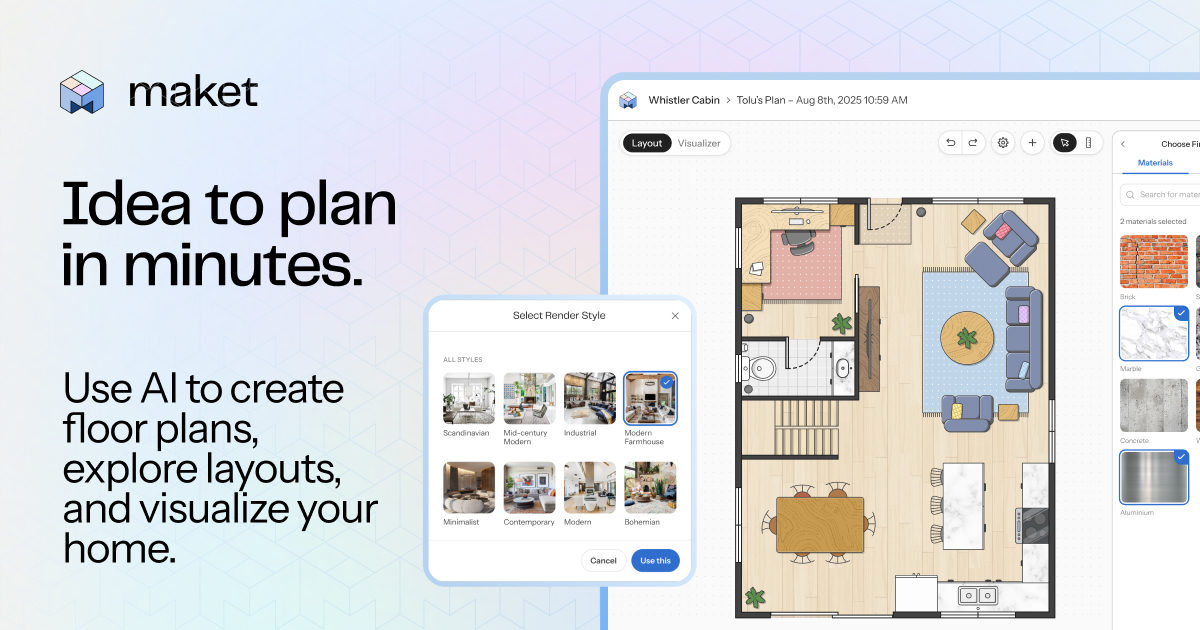 Maket ▲ 1 ▼ 0
Maket is an AI-powered residential design studio built to take you from a text prompt to an editable floor plan and 3D walkthrough without wrestling with legacy CAD tools.
 Consistent Character AI ▲ 1 ▼ 0
Anyone who has ever tried building a visual narrative with general-purpose image models knows the drill: tweak a single word in your prompt, and your main character suddenly gets a different facial structure, new eye color, and completely altered hair.