
 Trial
Trial
Van Gogh Studio
CTG2O9Quick facts
- Pricing model
- Trial
- Minimum price
- from $89.40/year
- Free access
- Trial access
- Regional payment options
- Pay directly on the website
- Service status
- Online, checked
- User rating
Developer and reliability
Information about the developer and the service's terms. This is a factual reference, not a quality assessment or a guarantee of safety.
- Developer
- Van Gogh Studio
- Service launch
- July 19, 2025
- Domain registered
- July 20, 2025
- The domain registration date is not the service's launch date.
Compare with alternatives
Choose a pair to compare features, pricing and assessments.
Editorial assessment
Good productThe standout advantage of Van Gogh Studio is eliminating the painful dilemma of deciding which single video generator gets your monthly budget. The platform provides a versatile Swiss Army knife: you can run an identical prompt across Veo, Sora, or Kling, replicate camera moves straight from a video reference, and immediately turn around an e-commerce promo.
Demanding models certainly devour credits quickly, and the servers will occasionally make you wait in line, but as a practical production workstation for creators, the service firmly earns its standing as a good product.
- Functionality High
- Price and value Good
- Ease of use Good
- Reliability and support Average
- Innovation Good
About the tool
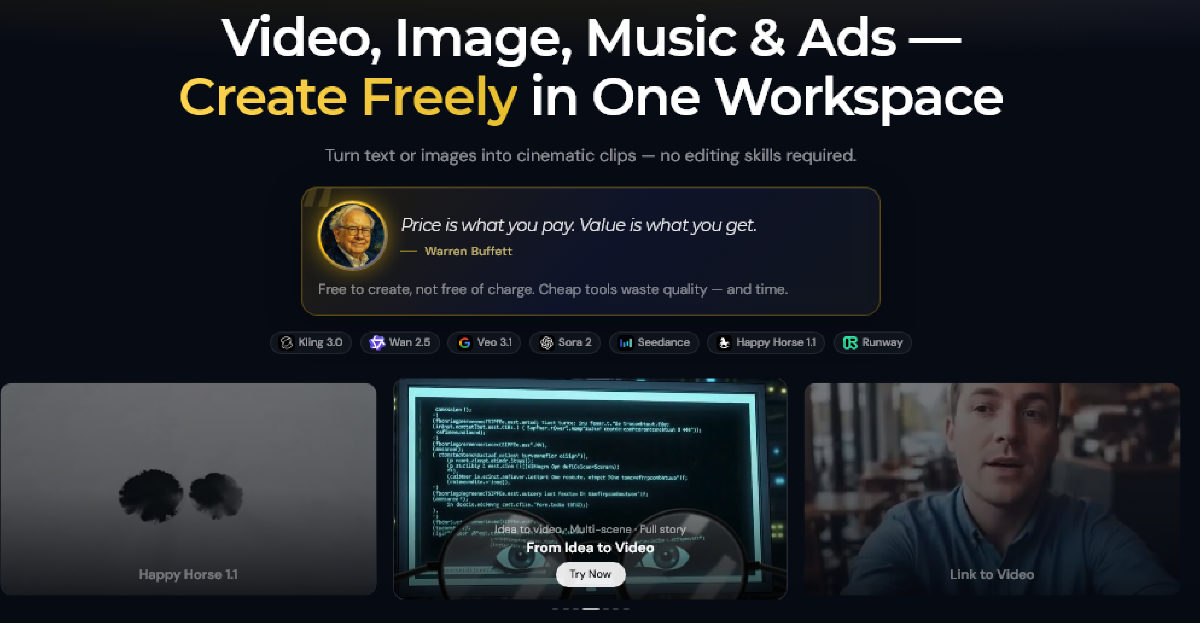
Van Gogh Studio solves the biggest headache in modern creative production: having to pay for five separate AI subscriptions just to see which neural network handles a prompt best. The web platform works as an all-in-one generative studio, combining video, image, audio, and marketing utilities into a single browser dashboard.
At the core of the service is a multi-model video generator. Instead of being locked into a single provider, you can generate clips using leading engines like Veo, Sora, Kling, Runway, Wan, Seedance, and Grok. The generation toolkit covers:
- Text-to-video and image-to-video: turning text descriptions or static product shots into motion clips.
- Multimodal scene guidance: using models like Seedance to feed up to a dozen mixed assets—reference images for character looks, sample videos for camera angles and motion dynamics, and audio tracks for pacing—via simple `@` tagging.
- Start-and-end frame animation: establishing the opening and closing keyframes and letting the AI interpolate fluid movement between them.
- E-commerce toolkits: turning live product URLs into promotional videos (Link to Video), creating UGC-style commercials, and generating virtual fashion try-ons.
- Long-form narratives: an AI story studio that outlines scripts, plans scenes, and stitches together narrative video projects up to five minutes long.
- Editing and enhancement: video upscalers, inpainting, background removers, retro VHS overlays, and digital human avatar presenters with over a hundred synthetic voices.
How it helps you
Van Gogh Studio is built for creators and commercial teams who need quick creative velocity without juggling separate AI subscriptions.
It directly serves:
- SMM managers and content creators testing prompt styles across different engines side-by-side to produce viral social clips.
- E-commerce brands and marketers turning product links and photos into marketplace promos and UGC ads in minutes.
- Video editors and animators controlling camera choreography and character motion through reference clips rather than complex manual keyframing.
Pros and cons
Pros
- Multi-model video generation hub featuring engines from Veo, Sora, Kling, Runway, and Seedance in one place
- Multimodal reference control allowing camera motion, visual styling, and rhythm to be guided by uploaded video and audio
- Dedicated e-commerce workflows to generate ad creatives directly from product URLs
- Free initial tier with daily claimable credits to test generation pipelines without a credit card
- Full commercial usage rights granted for all generated output
Cons
- High credit drain when rendering via premium models at maximum fidelity
- Standard generation queues can slow down noticeably during peak API usage
- Single-shot generation is limited to short clips, requiring the multi-scene Long Video tool for longer formats
User reviews
No reviews collected yet
We are collecting user reviews of this tool from public sources. They will appear here soon.
Pricing
Prices are based on the provider's information and may change.
Looking for a free option? Try these alternatives to Van Gogh Studio:



Compare with popular alternatives
Compare key features, prices and capabilities with similar tools
| Feature | Current tool |  |  |  |
|---|---|---|---|---|
| Pricing model | Trial | One-time purchase | Trial | Pay as you go |
| Minimum price | from $89.40/year | from RUB 199 one-time | from RUB 990/month | from $3 one-time |
| Free access | Trial access | No | Trial access | No |
| Regional payment options | Direct payment | Direct payment | Direct payment | Direct payment |
| Editorial assessment | Good product | Good specialized service | Average | Good product |
| User rating | ||||
| Current tool |























Frequently asked questions
Can I use videos generated on Van Gogh Studio commercially?
Yes. The platform grants commercial usage rights, meaning you own the output and can use generated clips for client work, paid advertising, and social media monetization.
How does multimodal prompting work in the platform?
Using advanced engines like Seedance, you can upload reference images, reference videos, and audio tracks, then tag them in your prompt using syntax like @image1 for style, @video1 for camera movement, and @audio1 for pacing.
What are the limitations of the free plan?
Free accounts receive starter credits, a daily generation quota, and basic support. Single video clips are limited to 15 seconds, and access to premium rendering queues and effect templates is restricted unless you upgrade.
How long does a video generation take?
Most standard clips render in 2 to 5 minutes. The exact processing time depends on the chosen neural model, output resolution, and real-time cloud server loads, with live progress displayed during rendering.
Similar tools

 WaveSpeed AI ▲ 2 ▼ 0
WaveSpeed AI is an all-in-one cloud inference engine and media aggregator that bypasses the headache of managing dozens of separate AI subscriptions.

 CoreMind ▲ 2 ▼ 0
Managing generative production usually turns into a messy logistical chore: you bounce across half a dozen separate platforms, manage multiple foreign subscriptions, and spend hours adjusting conflicting prompt structures.
 MiniMax ▲ 2 ▼ 0
MiniMax is a full-stack multimodal artificial intelligence ecosystem built on proprietary foundation models.

 lora.pro ▲ 2 ▼ 0
Forget spending hours setting up local diffusion environments, tweaking weights, or crafting fifty-word prompt formulas just to get a decent profile picture.
 aiTurbo ▲ 1 ▼ 0
aiTurbo is a web-based creative hub that aggregates over 35 generative AI models for image and video synthesis into a single browser interface.

 Fotoro ▲ 1 ▼ 0
Fotoro is a browser-based generative graphics studio engineered to replace physical photo shoots, studio equipment, and manual retouching.