
 Paid
Paid
Сократик
Quick facts
- Pricing model
- Paid
- Minimum price
- from RUB 469/month
- Free access
- No
- Regional payment options
- Pay directly on the website
- Service status
- Online, checked
- User rating
Developer and reliability
Information about the developer and the service's terms. This is a factual reference, not a quality assessment or a guarantee of safety.
- Developer
- ООО "СОКРАТИК"
- Legal entity
- ОБЩЕСТВО С ОГРАНИЧЕННОЙ ОТВЕТСТВЕННОСТЬЮ "СОКРАТИК"
- Legal entity's country
- Russia
- Registration details
- ОГРН 1255000031747
- Service launch
- February 2024
- Domain registered
- March 18, 2024
- The domain registration date is not the service's launch date.
Compare with alternatives
Choose a pair to compare features, pricing and assessments.
Editorial assessment
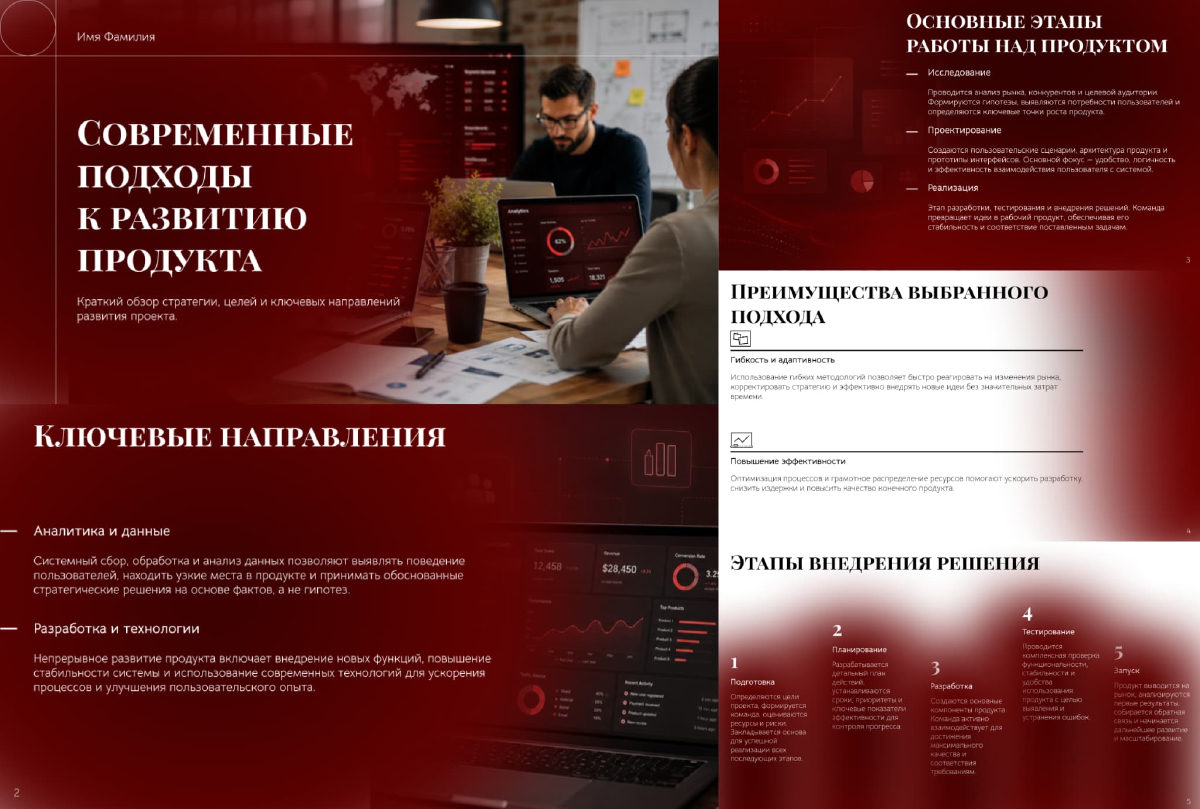
Good specialized serviceСократик earns the Good specialized service status because it tackles one specific pain point cleanly without bloated gimmicks. While most generative tools only hand you a block of text, this platform sets up a complete assembly line: drop a file in, walk away with clear slides, visuals, tables, and an oral presentation script.
It is not trying to reinvent cloud computing, but it delivers dependable utility:
- The Unlimited plan at 469 RUB per month keeps it accessible for students facing thesis deadlines and professionals handling daily reports.
- Editable PPTX export completely mitigates the basic nature of the online editor: just download the file and polish the typography in your desktop app.
- Key constraints to keep in mind are the watermarks on unpaid previews and the need to verify procedural charts on specialized subjects.
- Functionality Good
- Price and value Good
- Ease of use Good
- Reliability and support Average
- Innovation Average
About the tool
Сократик is a cloud-based AI service designed to eliminate the tedious grind of manual slide making. Instead of leaving you with raw bullet points like a standard chatbot, it runs an end-to-end production workflow: feed it a topic prompt or upload an existing file, and it spits out a structured presentation complete with slide copy, layouts, AI-generated images, tables, diagrams, and even an oral speech script in about a minute.
The platform handles two main workflows:
- Prompt-to-deck generation: Type in a few keywords or an elaborate prompt, select an audience tone (such as business or academic), and let the orchestrator structure the narrative from scratch.
- File-to-deck synthesis: Drop in documents up to 50 pages across multiple formats (PDF, DOC, DOCX, XLSX, ODP, or PPTX). The system extracts core takeaways and condenses them into slide-ready blocks.
Inside the browser workspace, you can tweak text, reorder slides, swap visual components, or pick alternative layouts on the fly. When you are done, the presentation exports to standard PDF or fully editable PowerPoint format, allowing you to fine-tune every shape and text frame locally.
How it helps you
Saves hours of formatting hassle for students, educators, and working professionals by automatically turning dense raw materials, spreadsheets, and lecture notes into structured visual decks ready for defense or reporting.
Pros and cons
Pros
- Generates complete presentation decks with copy, images, and tables in about a minute
- Accepts diverse source formats including PDF, DOCX, and XLSX files up to 50 pages
- Exports to fully editable PPTX files so you can tweak designs in desktop software
- Generates a accompanying spoken presentation script alongside the slides
- Supports academic formatting with math symbols, subscripts, and chemical formulas
- Budget-friendly Unlimited plan priced at 469 RUB per month
Cons
- Free preview mode places watermarks across exported slides
- Web editor is limited to basic layout and text tweaks without deep vector control
- Procedural charts and visuals on specialized technical topics require manual fact-checking
User reviews
No reviews collected yet
We are collecting user reviews of this tool from public sources. They will appear here soon.
Pricing
Prices are based on the provider's information and may change.
Looking for a free option? Try these alternatives to Сократик:
Compare with popular alternatives
Compare key features, prices and capabilities with similar tools
| Feature | Current tool |  |  |  |
|---|---|---|---|---|
| Pricing model | Paid | Trial | Paid | Trial |
| Minimum price | from RUB 469/month | from RUB 390/month | from RUB 399/month | from €6.01/month |
| Free access | No | Trial access | No | Yes |
| Regional payment options | Direct payment | Direct payment | Direct payment | Direct payment |
| Editorial assessment | Good specialized service | Average | Good specialized service | Good product |
| User rating | ||||
| Current tool |
























Frequently asked questions
What kind of source files can I upload to generate slides?
The platform accepts documents and tables in PDF, DOC, DOCX, ODP, and XLSX formats, as well as existing PPTX presentation files and unstructured text up to 50 pages per batch.
Can I edit the generated slides in standard presentation software?
Yes. While you can make basic edits directly in the web browser, the platform allows you to export your deck as an editable Microsoft PowerPoint (.pptx) file where text frames, tables, and blocks remain fully customizable.
Does Сократик support academic presentations with formulas?
Yes. The platform includes support for academic formatting, including mathematical and chemical formulas, sub- and superscript notation, and structured data tables.
How do I remove watermarks from downloaded presentations?
Clean exports without system watermarks require an active paid subscription, such as the Unlimited plan available for 469 RUB per month.
Similar tools
 Slidy AI ▲ 3 ▼ 0
Making slide decks from scratch has always been a painful slog of moving text boxes around, fighting with font pairings, and hunting for templates that don't look like they were made in 2005.
 TeraBox - Your All-in-One AI Workspace ▲ 2 ▼ 0
TeraBox has expanded beyond raw cloud storage into an integrated productivity hub known as TeraBox AI Workspace.
 Кэмп (ex. Кампус) ▲ 2 ▼ 0
Anyone who has spent college nights wrestling with formatting margins and compiling bibliographies knows that academic routine can drain more energy than the actual studying.
 Speak English with Loora AI ▲ 1 ▼ 0
Loora is a voice-first mobile AI English tutor built to bypass the awkwardness of traditional language learning and get users speaking out loud immediately.

 eSkilled AI Course Creator ▲ 0 ▼ 0
Building a full online curriculum from scratch usually means juggling instructional designers, slide decks, voice talent, and quiz builders for weeks.